Whitney Carpenter Algorithm

Cybersecurity senior with hands-on experience in cybersecurity, systems, and full-stack software development.
CSCI 496: Senior Portfolio
In partial fulfillment of the requirements for the degree of
Bachelor of Science in Cybersecurity (class of 2026)
View My Resume
View My LinkedIn Profile
SecurePass Documentation
Honors Senior Project
Whitney Carpenter
CSCI 499 / Dr. Hayes
Spring 2026
Table of Contents
- 1. Statement of Purpose
- 2. Research & Background
- 3. Project Language(s), Software, and Hardware
- 4. Project Requirements
- 5. Project Implementation Description & Explanation
- 6. Test Plan
- 7. Test Results
- 8. Challenges Overcome
- 9. Future Enhancements
- 10. Defense Presentation Slides
Install SecurePass
1. Statement of Purpose (with the Problem Statement)
A user-friendly extension to evaluate password strength and provide instant feedback will enhance online security and protect user privacy. Ideally, users would create strong, complex passwords adhering to the highest security standards; however, many struggle with this, opting for simple, reused passwords. This is a critical issue as weak passwords create significant security risks, including hacking attempts, data breaches, and identity theft, potentially leading to financial loss, privacy invasion, and reputational damage. According to the Verizon Data Breach Investigations Report¹, 81% of hacking-related breaches involve compromised and weak passwords. Using a user-friendly Chrome extension to evaluate password strength will significantly mitigate these risks. Users stand to benefit substantially from this extension in the form of enhanced security and the support of their right to privacy. Weak passwords are a major security risk that can lead to significant consequences, but by developing a user-friendly Chrome extension that evaluates password strength and provides instant, local feedback, we can help users create stronger passwords, enhance their online security, and protect their privacy. This project was completed as part of an Honors Senior Project, requiring additional implementation effort, including preparing the extension for real-world deployment and meeting elevated documentation and testing standards.
¹ Verizon. (2024). Data Breach Investigations Report. Retrieved from https://www.verizon.com/business/resources/T484/reports/2024-dbir-data-breach-investigations-report.pdf.
2. Research & Background
Passwords are one of the most commonly used methods of authentication, but they are also one of the weakest points in cybersecurity. Many users create passwords that are easy for them to remember instead of focusing on security, and they typically reuse them across multiple accounts. This increases the risk of attacks, which may include brute force, dictionary attacks, and credential stuffing. Due to this, it is very important that password strength is improved at the user level in order to reduce overall security risks.
According to guidelines from the National Institute of Standards and Technology (NIST), modern password policies should prioritize length and usability over super complex rules (NIST, 2020). NIST recommends using longer passwords, avoiding strict composition requirements, and providing users with helpful feedback during password creation. While NIST does not require the use of special characters, it can further enhance password strength when used appropriately. SecurePass incorporates some traditional complexity elements, such as special characters, to strengthen entropy calculations and provide clearer feedback to users when they create a password.
Password strength in SecurePass is evaluated using a combination of length, character variety, and entropy. Entropy measures how unpredictable a password is, so a higher entropy means the password is stronger and harder to guess. In SecurePass, entropy is increased when users include a mix of uppercase letters, lowercase letters, numbers, and special characters. Having a mix of all of these elements helps users move beyond simple and commonly used password patterns, which improves overall unpredictability.
Research shows that simply adding predictable patterns, like replacing ‘a’ with ‘@’, doesn’t always significantly improve password security (Gaw & Felten, 2006). However, when combined with a greater length and randomness, adding special characters can significantly increase password security. Therefore, SecurePass uses a hybrid approach that considers both entropy and composition rules to give a more balanced evaluation.
Many existing password strength meters rely on heuristic-based scoring systems. While that may be helpful, these tools usually fail to explain why a password is weak or how to improve it. Research in usable security shows that users are more likely to create stronger passwords when they receive immediate, clear, and actionable feedback (Ur et al., 2012). SecurePass builds on this idea by providing real-time feedback along with specific suggestions like increasing length or adding special characters.
Privacy is another important consideration when designing password tools. Some applications transmit password data to external servers for analysis, which could lead to security risks. The best practice would instead be to perform password evaluation locally to ensure that sensitive data is never transmitted or stored (NIST, 2020). SecurePass follows this approach by evaluating passwords locally and only storing hashed passwords.
Overall, research and industry standards show that effective password tools must balance security, usability, and privacy. SecurePass reflects these principles by combining entropy-based evaluation with composition requirements, delivering immediate feedback, and ensuring that all processing occurs locally within the user’s browser.
Gaw, S., & Felten, E. W. (2006). Password management strategies
for online accounts. Proceedings of the 2nd Symposium on Usable Privacy and Security (SOUPS).
National Institute of Standards and Technology. (2020). Digital
Identity Guidelines: Authentication and Lifecycle Management (SP 800-63B). https://pages.nist.gov/800-63-3/sp800-63b.html
Ur, B., Kelley, P. G., Komanduri, S., Lee, J., Maass, M.,
Mazurek, M. L., Passaro, T., Shay, R., Vidas, T., Bauer, L., Christin, N., & Cranor, L. F. (2012). How does your password measure up? The effect of strength meters on password creation. USENIX Security Symposium.
3. Project Language(s), Software, and Hardware
Languages:
JavaScript HTML CSS
Hardware:
Windows PC, Linux
Software:
Visual Studio Code, Chrome Browser, Chrome Developer Tools, Node.js, Git & GitHub
4. Project Requirements
Requirement #: 1 Requirement Type: 9
Description: The extension will evaluate password strength based on criteria such as length, complexity, and entropy.
Rationale: Weak passwords are one of the most common vulnerabilities leading to security breaches, so evaluating password strength will mitigate this issue.
Origination: Whitney Carpenter
Fit Criterion: The password strength evaluation will use an algorithm to assess at least the three criteria mentioned.
Priority: 1
Dependencies: none
Requirement #: 2 Requirement Type: 9
Description: The extension will provide real-time feedback on the strength of the passwords entered by the users.
Rationale: Real-time feedback allows users to adjust their passwords immediately, improving security on the spot.
Origination: Whitney Carpenter
Fit Criterion: Provides real-time feedback to the user.
Priority: 5
Dependencies: 1
Requirement #: 3 Requirement Type: 9
Description: The extension will offer actionable suggestions to improve password strength.
Rationale: Many users lack knowledge of how to create strong passwords, so these suggestions can guide them.
Origination: Whitney Carpenter
Fit Criterion: The suggestions for improvement will be displayed clearly based on the password evaluation.
Priority: 7
Dependencies: 1
Requirement #: 4 Requirement Type: 9
Description: All password evaluations will be performed locally within the extension without transmitting any data.
Rationale: Local processing ensures users’ privacy and adherence to security best practices.
Origination: Whitney Carpenter
Fit Criterion: Password evaluations must not trigger network activity, which will be verified through testing.
Priority: 3
Dependencies: none
Requirement #: 5 Requirement Type: 10
Description: The extension interface will display feedback in a visually clear and accessible format.
Rationale: A visually clear and accessible format enhances usability and helps users understand the feedback.
Origination: Whitney Carpenter
Fit Criterion: Feedback will be displayed using clear visual indicators, such as color-coded labels and concise textual explanations.
Priority: 12
Dependencies: 2
Requirement #: 6 Requirement Type: 11
Description: The user interface will be intuitive and accessible to non-technical users.
Rationale: An intuitive UI improves usability and increases user adoption of the extension.
Origination: Whitney Carpenter
Fit Criterion: The feedback and controls must be understood by users with no technical background during the testing stage.
Priority: 8
Dependencies: 1, 5
Requirement #: 7 Requirement Type: 11
Description: Feedback and suggestions shall include brief educational insights about password security.
Rationale: Brief educational insights within the feedback will improve users’ knowledge for future passwords that they create.
Origination: Whitney Carpenter
Fit Criterion: The extension will provide a brief insight about password security, ensuring that during testing, at least 90% of users correctly understand why their password was rated weak or strong.
Priority: 13
Dependencies: 1, 3, 5
Requirement #: 8 Requirement Type: 11
Description: The extension will integrate smoothly with Chrome and require minimal setup by the user.
Rationale: This will ensure users can install and start using the extension without technical obstacles.
Origination: Whitney Carpenter
Fit Criterion: The extension will install with a single click from the Chrome Web Store.
Priority: 14
Dependencies: 1, 2, 6
Requirement #: 9 Requirement Type: 12
Description: Feedback will be displayed within 2 seconds of password entry.
Rationale: Quick feedback ensures a smooth user experience, allowing users to adjust passwords instantly.
Origination: Whitney Carpenter
Fit Criterion: The product shall respond in less than 1 second for 90 per cent of the interrogations. No response shall take longer than 2.5 seconds.
Priority: 6
Dependencies: 1, 4
Requirement #: 10 Requirement Type: 12
Description: The extension will not compromise user security under any circumstances.
Rationale: The extension not compromising user security ensures that feedback does not inadvertently weaken password protection.
Origination: Whitney Carpenter
Fit Criterion: The extension will provide security-focused recommendations that align with industry standards.
Priority: 9
Dependencies: 1, 3, 9
Requirement #: 11 Requirement Type: 12
Description: The extension will be available and functional whenever Chrome is active, barring updates.
Rationale: The extension should be consistently available whenever Chrome is active to ensure users can rely on it for password evaluations.
Origination: Whitney Carpenter
Fit Criterion: The extension will load automatically when a password field is detected.
Priority: 10
Dependencies: 1, 4, 6
Requirement #: 12 Requirement Type: 12
Description: The extension will handle password evaluations efficiently without consuming excessive browser resources.
Rationale: The extension must efficiently handle password evaluations, ensuring that it will not negatively impact browser performance.
Origination: Whitney Carpenter
Fit Criterion: CPU and memory usage must remain below 5% of total browser resources during testing.
Priority: 11
Dependencies: 1, 2, 4
Requirement #: 13 Requirement Type: 12
Description: The extension could be expanded to work on other browsers, such as Edge or Firefox.
Rationale: Expanding browser support can increase the extension’s reach and usability.
Origination: Whitney Carpenter
Fit Criterion: The extension would have to be refactored to comply with Edge or Firefox-specific APIs.
Priority: 20
Dependencies: none
Requirement #: 14 Requirement Type: 13
Description: The extension will interact exclusively within the Chrome browser environment.
Rationale: The extension must interact exclusively within the Chrome browser to ensure seamless functionality without external system dependencies.
Origination: Whitney Carpenter
Fit Criterion: The extension will correctly identify password fields and provide feedback within Chrome.
Priority: 15
Dependencies: 1, 2, 4
Requirement #: 15 Requirement Type: 13
Description: The extension will be distributed via the Chrome Web Store for ease of access.
Rationale: The extension should be distributed through the Chrome Web Store to ensure easy access and credibility for users.
Origination: Whitney Carpenter
Fit Criterion: The extension will be packaged and submitted to the Chrome Web Store, successfully passing all review and security compliance checks.
Priority: 18
Dependencies: 10, 6
Requirement #: 16 Requirement Type: 13
Description: The extension will be released by Spring 2026.
Rationale: The extension must meet the senior project timeline to align with academic requirements.
Origination: Whitney Carpenter
Fit Criterion: The extension will be fully developed, tested, and submitted according to the timeline outlined in the project schedule.
Priority: 16
Dependencies: all
Requirement #: 17 Requirement Type: 14
Description: Code will be modular and well-documented to simplify debugging and updates.
Rationale: The extension must be designed for easy maintenance to allow future updates, bug fixes, and enhancements.
Origination: Whitney Carpenter
Fit Criterion: The codebase will be modular, well-documented, and structured for ease of modification, verified through code reviews.
Priority: 17
Dependencies: 1, 4, 6
Requirement #: 18 Requirement Type: 14
Description: The extension will allow future modifications for enhanced password strength algorithms.
Rationale: The extension must be adaptable to support future improvements.
Origination: Whitney Carpenter
Fit Criterion: The architecture will allow for future feature integration with minimal rework.
Priority: 19
Dependencies: 1, 3, 7
Requirement #: 19 Requirement Type: 15
Description: Password evaluations will occur locally, with no passwords or sensitive data being stored or transmitted by the extension.
Rationale: Protecting user privacy is a core principle of this project.
Origination: Whitney Carpenter
Fit Criterion: Password evaluations will occur locally without leaving the user’s browser.
Priority: 2
Dependencies: 4
Requirement #: 20 Requirement Type: 17
Description: The extension will comply with NIST guidelines and other best practices for password security.
Rationale: Compliance with established standards ensures the extension meets industry expectations and legal requirements.
Origination: Whitney Carpenter
Fit Criterion: Features and algorithms must align with NIST guidelines as verified through documentation reviews and testing.
Priority: 4
Dependencies: 1, 4, 9
5. Project Implementation Description & Explanation
The SecurePass Chrome extension was implemented using a modular architecture that separates functionality across multiple files, including manifest.json, bubble.js, popup.js, background.js, and supporting resources such as commonPasswords.js and CSS files. This structure improves maintainability and allows each component to handle a specific responsibility within the system.
The manifest.json file defines the extension configuration, permissions, and execution environment using Manifest Version 3. It registers bubble.js as a content script that runs on all webpages at the document_idle stage, allowing the extension to interact with page elements after they are fully loaded. The extension uses minimal permissions, including activeTab and storage, ensuring that it only accesses necessary resources while maintaining user privacy.
The primary interaction with web pages is handled by bubble.js. This script detects all password input fields (input[type=’password’]) and dynamically injects a visual indicator (a lock icon) directly into the page. To ensure compatibility with dynamically generated content, a MutationObserver continuously monitors changes to the DOM and re-applies detection logic when new elements are added. This allows SecurePass to function correctly on modern websites that load content asynchronously.
When a password field is detected, the script wraps the input element in a container and inserts a clickable “bubble” icon beside it. This icon serves as an entry point for user interaction and triggers the extension popup when clicked.
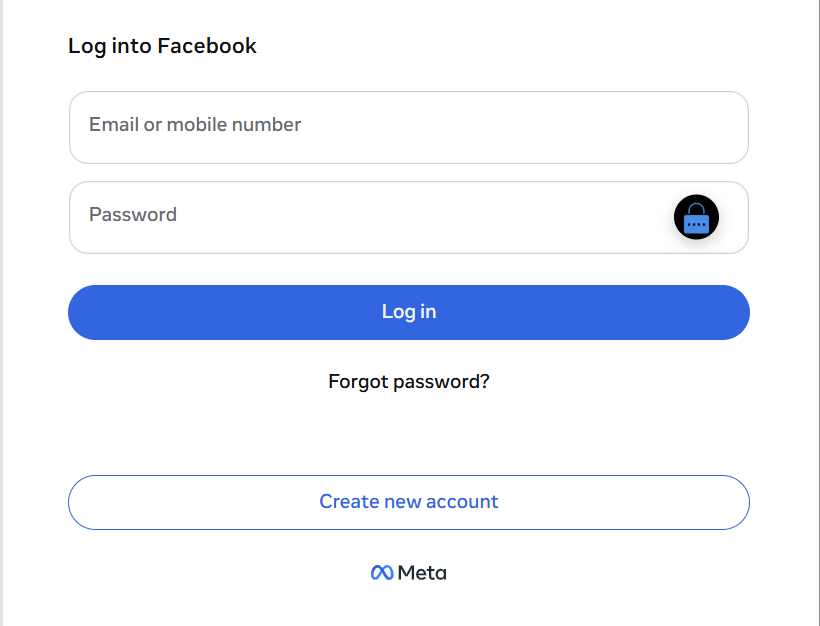
Fig 1. SecurePass injecting a lock icon next to a detected password field.
The main password evaluation logic is implemented in popup.js, which handles user input within the extension popup interface. When a user enters a password, the system evaluates its strength using a scoring algorithm based on length and character composition. The algorithm checks for the presence of uppercase letters, lowercase letters, numbers, and special characters, assigning a score based on these criteria. Passwords are then classified into categories such as “Weak,” “Moderate,” “Strong,” and “Very Strong.”
In addition to rule-based scoring, SecurePass calculates password entropy using the formula:
Entropy = password length × log₂(character set size)
The character set size is determined dynamically based on the types of characters used in the password. This provides a quantitative measure of password strength and is displayed to the user as a visual progress bar.
SecurePass also fulfills Requirement 7 (Educational Insights) by providing brief explanations alongside password feedback. For example, when a password is rated as weak, the system not only assigns a label but also explains why (e.g., insufficient length or lack of character variety) and provides actionable suggestions.
This is demonstrated in Figure 2, where the user is shown both the entropy value and a classification label, along with guidance for improvement. These insights help users understand password security principles rather than simply receiving a score.
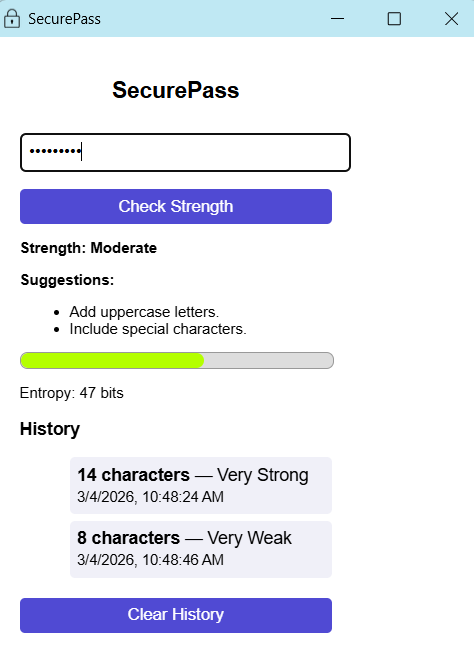
Fig 2. SecurePass popup showing entropy value and strength classification.
To further enhance security, SecurePass incorporates a list of commonly used weak passwords stored in commonPasswords.js. Instead of storing plaintext passwords, the system hashes user input using the SHA-256 algorithm via the Web Crypto API (crypto.subtle.digest). The resulting hash is compared against a set of precomputed hashes of common passwords. If a match is found, the password is immediately classified as “Very Weak,” regardless of its composition.
The extension also includes a history feature that stores previously evaluated passwords in a secure manner. Rather than storing raw passwords, only the hashed value, length, strength rating, and timestamp are saved using Chrome’s local storage API. This ensures that sensitive data is never exposed while still allowing users to review past results.
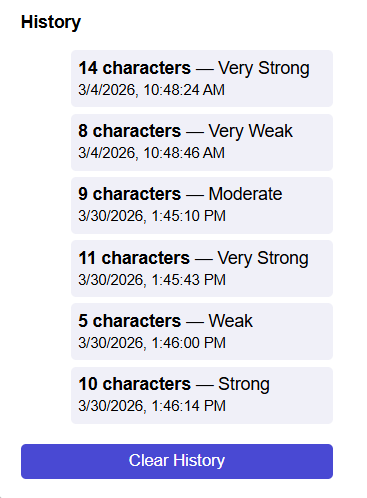
Fig 3. Password history displayed using hashed values and metadata.
All password evaluation and processing occur entirely within the user’s browser. No password data is transmitted to external servers. This was verified using Chrome Developer Tools by monitoring the Network tab during password input and confirming that no network requests were generated by the extension.
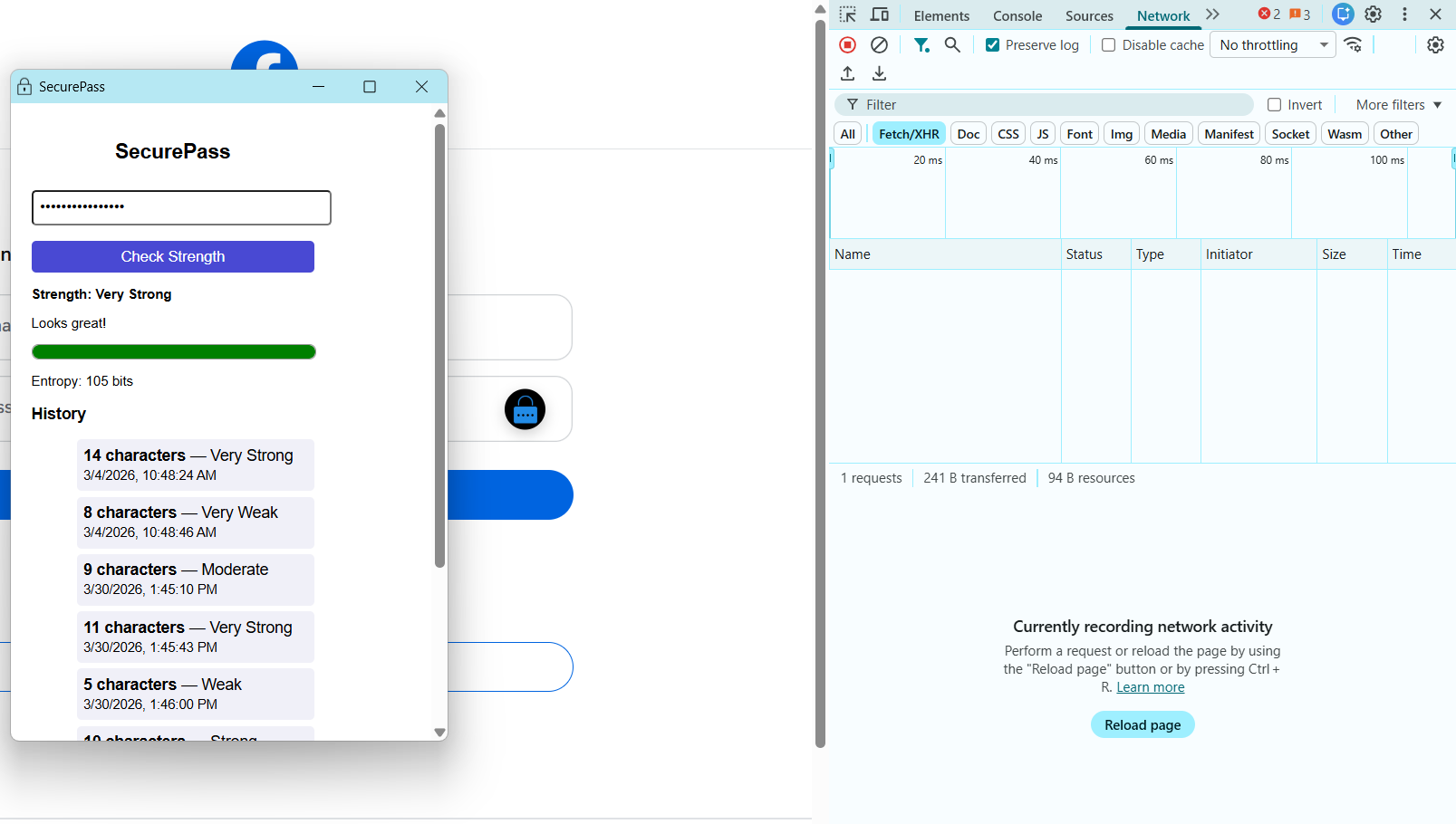
Fig 4. Network activity showing no external data transmission during password evaluation.
The user interface is styled using style.css and bubble.css, providing a clean and intuitive design. Visual feedback is enhanced through a dynamic entropy bar that changes color based on password strength, using a gradient interpolation function. This allows users to quickly understand the quality of their password through both numerical and visual indicators.
Performance considerations were also addressed during development. Event listeners are lightweight and respond instantly to user input, while the use of efficient DOM observation ensures minimal overhead. The extension operates within strict performance constraints, maintaining responsiveness without negatively impacting browser performance.
Overall, SecurePass combines real-time password detection, entropy-based evaluation, secure hashing, and user-friendly feedback into a cohesive system. The modular design allows for future enhancements, such as improved scoring algorithms or cross-browser compatibility, without requiring major architectural changes.
Link to the source code repository: https://github.com/wbcarpenter/CSU-Senior-Project-Whitney-Carpenter/tree/a918a11932d7f63fef75c13ebe9382fdd12a7aef/src
6. Test Plan
TESTING OBJECTIVES
The objective of this test plan is to verify that SecurePass meets all defined requirements established in the Requirements Document. Testing will ensure:
- Password strength evaluation functions correctly and consistently
- Feedback is provided in real-time without noticeable delay
- No password data is transmitted or stored externally
- The user interface is clear, accessible, and functional across devices
FEATURES TO BE TESTED
| # | Feature | Related Requirement(s) | Description |
|---|---|---|---|
| 1 | Password strength evaluation | Req. 1 | Evaluates password based on length, complexity, and entropy |
| 2 | Real-time feedback | Req. 2, 9 | Provides strength rating within 2 seconds of entry |
| 3 | Suggestions for improvement | Req. 3 | Displays actionable recommendations |
| 4 | Local evaluation only | Req. 4, 19 | Ensures all data stays within the user’s browser |
| 5 | User interface design | Req. 5, 6 | Displays clear, color-coded, and accessible feedback |
| 6 | Educational insights | Req. 7 | Provides brief password security educational insights |
| 7 | Performance and responsiveness | Req. 9, 12 | Confirms low CPU/memory usage |
| 8 | Chrome Compatibility | Req. 8, 14 | Verifies extension integrates smoothly with Chrome |
| 9 | Security Compliance | Req. 10, 20 | Meets NIST guidelines and cybersecurity best practices |
| 10 | Automatic activation and availability | Req. 11 | Confirms the extension loads automatically when Chrome is active |
FEATURES NOT TO BE TESTED
| Feature | Reason |
|---|---|
| Cross-browser compatibility (Edge, Firefox) | Future enhancement (Req. 13) |
| Chrome Web Store publication | Not in testing phase, deployment only (Req. 15) |
| Future algorithm upgrades | Beyond current project scope (Req. 18) |
UNIT TESTING
Unit Test Strategy and Objectives
Unit testing will verify the correct behavior of individual components within SecurePass. The goal is to ensure that each function operates as intended before integration.
Scope
- Included:
- Password strength evaluation algorithm
- Feedback rendering module
- Suggestion generation function
- Excluded:
- Chrome API integrations
- Full user interface layout
- External data transmission
Testing Approach
- Use Jest or Mocha for automated JavaScript testing.
- Execute all tests in a local offline environment to verify no network communication.
- Evaluate both normal and edge case passwords for accuracy and consistency.
- Record results in unit test logs with pass/fail indicators.
Test Environment
Hardware: Windows 10 / 11 PC, 8GB RAM minimum Software: Chrome Browser (latest version), Visual Studio Code, Node.js Network: Local environment, offline tests where possible
UNIT TEST CASES
| # | Objective | Input | Expected Results | Test Deliverables |
|---|---|---|---|---|
| 1 | Verify weak password detection | “password123” | Strength: Weak | Unit test report |
| 2 | Verify strong password detection | “L!m@x#9Qz2” | Strength: Strong | Unit test report |
| 3 | Handle long input efficiently | 256-character random string | Strength: Strong | Performance log |
| 4 | Check suggestion display | “123456” | Displays suggestions for improvement | Unit test report |
| 5 | Confirm no network calls | Random passwords | No network activity recorded | Browser dev tools log |
| 6 | Handle special characters | “pä$$WørD!” | Strength: Medium | Unit test report |
Acceptance Criteria
- 100% of unit test cases must pass before integration begins.
- All password evaluations must occur locally with no external network activity.
- Feedback must appear within 2 seconds of password entry.
USER-ACCEPTANCE TESTING (UAT)
User-Acceptance Test Strategy and Objectives
User-Acceptance Testing (UAT) will ensure that SecurePass is intuitive, responsive, and educational for end users. It evaluates how effectively users understand and interact with password feedback.
Scope
- Focuses on usability, speed, and clarity of password feedback.
- Excludes performance benchmarking and Chrome API verification
Participants
- 5-10 users, including cybersecurity students and non-technical participants.
Test Environment
- Platform: Chrome browser
- Operating System: Windows 10/11
- Location: Controlled lab or classroom environment
- Monitoring: Observation and short feedback surveys
UAT Procedure
- Install SecurePass in Chrome.
- Create various passwords to test the strength feedback.
- Observe speed, clarity, and understanding of results.
- Complete a post-test survey using a 5-point Likert scale on usability and understanding.
User-Acceptance Test Cases
| # | Test Item | Expected Results | Actual Results | Date |
|---|---|---|---|---|
| 1 | User creates a weak password | Receives “Weak” rating with clear improvement tips | Receives “Weak” rating with clear improvement tips | 5/7/26 |
| 2 | User creates a strong password | Receives “Strong” rating, no extra tips shown | Receives “Strong” rating, no extra tips shown | 5/7/26 |
| 3 | Evaluate clarity of feedback | 90% of users understand feedback without guidance | 100% of users understand feedback without guidance | 5/7/26 |
| 4 | Evaluate educational tips | 90% of users report increased awareness of password security | 100% of users report increased awareness of password security | 5/7/26 |
| 5 | Test installation ease | Installed and functional within 2 minutes | Installed and functional within 2 minutes | 5/7/26 |
| 6 | Test performance and speed | Feedback appears within 2 seconds | Feedback appears within 2 seconds | 5/7/26 |
TEST DELIVERABLES
- SecurePass Test Plan
- Unit Test Scripts and Logs
- User Acceptance Testing Forms and Reports
- Defect/Enhancement Logs
- Final Test Summary Report
SCHEDULE
| Phase | Activity | Estimated Completion |
|---|---|---|
| Week 5-7 | Develop unit test cases | October 2025 |
| Week 8-10 | Draft integration and regression test plans | November 2025 |
| Week 11-12 | Prepare user-acceptance test outline and feedback forms | November 2025 |
| Week 13-15 | Finalize and submit Test Plan and source code | December 2025 |
| Spring 2026 | Execute all testing and record results | March-May 2026 |
APPENDIX
References:
- Verizon (2024). Data Breach Investigations Report.
https://www.verizon.com/business/resources/T484/reports/2024-dbir-data-breach-investigations-report.pdf - NIST SP 800-63B: Digital Identity Guidelines — Authentication and Lifecycle Management
7. Test Results
Unit Testing Results
All unit tests were executed using a local testing environment. The results are summarized below:
| Test Case | Result |
|---|---|
| Weak password detection | Pass |
| Strong password detection | Pass |
| Long input handling | Pass |
| Suggestion generation | Pass |
| No network activity | Pass |
| Special character handling | Pass |
All unit tests passed successfully, confirming that the password evaluation algorithm and feedback mechanisms function as intended. These results demonstrate that all core functional components operate reliably under both normal and edge-case conditions.
User-Acceptance Testing Results
User testing was conducted with 6 participants.
| Test Item | Result |
|---|---|
| Weak password feedback clarity | 100% understood |
| Strong password feedback | 100% correct interpretation |
| Educational insights effectiveness | 6/6 users reported improved understanding |
| Installation ease | All users completed within 2 minutes |
| Performance | Feedback consistently under 2 seconds |
These results confirm that SecurePass meets usability, performance, and educational goals outlined in the project requirements. Additionally, the results validate that Requirement 7 (Educational Insights) was successfully met, as all participants demonstrated an understanding of password strength reasoning.
Additionally, the results validate that Requirement 7 (Educational Insights) was successfully met, as all participants demonstrated an understanding of password strength reasoning.
8. Challenges Overcome
Security Options
One of the most significant challenges I encountered during this project was designing a secure and useful password history feature. The goal was to allow users to view previously evaluated passwords while ensuring that no sensitive data was exposed or stored insecurely.
Initially, I considered several different approaches. The first option was to store passwords in plaintext within local storage, which would have made retrieval and display straightforward. However, this was quickly identified as a major security risk, as storing plaintext passwords anywhere could expose users to serious vulnerabilities.
A second option was to avoid storing any password-related data entirely, and instead only store non-sensitive metadata like the password length and strength classification. While this approach would maximize security, it would significantly reduce the usefulness of the history feature by removing meaningful context for the user.
The final solution was to implement a secure middle-ground approach using cryptographic hashing. Passwords are processed using the SHA-256 hashing algorithm via the Web Crypto API before being compared and stored. This ensures the original password can’t be reconstructed from the stored data, while still allowing the system to track unique entries. Along with the hash, only non-sensitive metadata, like password length, strength rating, and timestamp, are stored using Chrome’s local storage API.
Though this was a challenge to figure out the best plan of action to have optimal functionality, security, and usability, the final approach ended up being a great balanced solution.
Deployment to Chrome Web Store
As part of this honors project, SecurePass was prepared for deployment to the Chrome Web Store. This required packaging the extension, adhering to Chrome’s Manifest V3 requirements, and ensuring compliance with security and privacy policies.
The deployment process introduced additional challenges, including validation requirements, permission restrictions, and ensuring that no sensitive data was transmitted. The extension was rejected for publication twice during this process, as shown in the figures below. This was due to unused or unecessary permissions. Although being rejected twice by the Chrome Web Store was frustrating, it taught me a lot about the importance of minimizing permissions and clearly justifying functionality. This process strengthened both my technical implementation and my understanding of real-world software review standards.
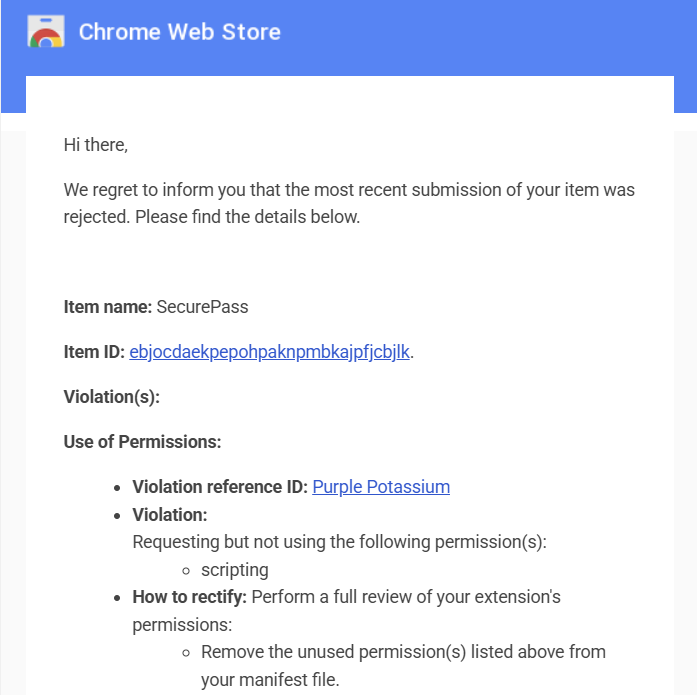
Fig 5. The first rejection was due to the scripting permission.
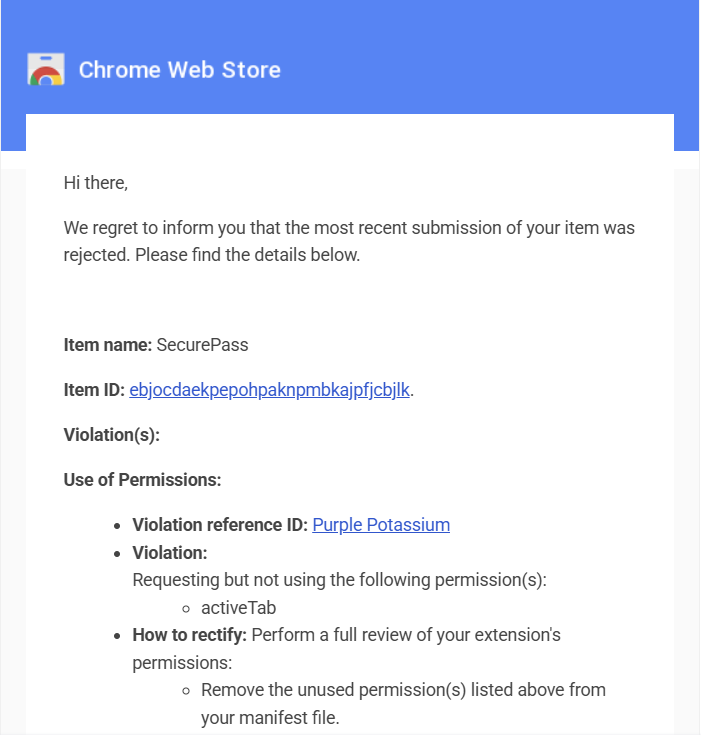
Fig 6. The second rejection was due to the activeTab permission.
Successfully preparing the extension for deployment demonstrates that SecurePass meets real-world application standards beyond a typical classroom project and fulfills the expectations of an Honors-level implementation.
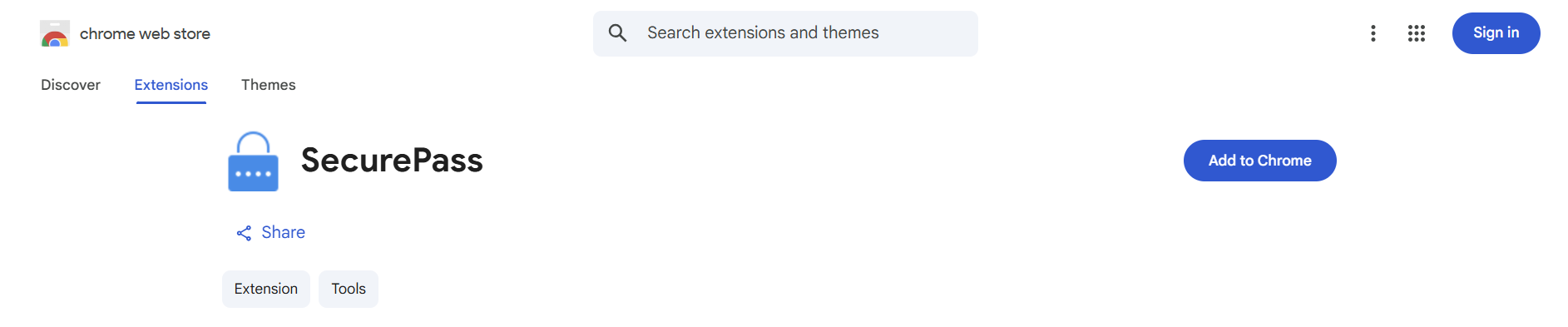
Fig 7. The extension was officially published in the Chrome Web Store on April 16, 2026.
Flexible UI
Another challenge involved ensuring that the extension worked reliably across modern websites that dynamically load content. Many websites don’t load login fields immediately, which initially caused the extension to miss certain inputs. This issue was resolved by implementing a MutationObserver to monitor changes in the DOM and dynamically detect newly added password fields. This significantly improved the reliability of the extension.
Overall, these challenges required careful consideration of security, usability, and performance trade-offs. Overcoming them resulted in a more secure, efficient, and user-friendly application.
9. Future Enhancements
While SecurePass meets its core objectives, there are a few enhancements that would further improve its functionality, security, and usability.
One potential improvement would be to refine the password strength evaluation algorithm. The current implementation uses a combination of rule-based scoring and entropy calculations; however, future versions could use more advanced techniques, like pattern recognition, dictionary checks beyond common passwords, or machine-learning-based strength estimation. This would allow for more accurate assessments of real-world password security.
Another enhancement would be expanding browser compatibility. Currently, SecurePass is designed specifically for Google Chrome, but it could be adapted to work with other browsers like Microsoft Edge or Mozilla Firefox. This would likely only require refactoring and testing, not a whole redesign, since these browsers support similar extension APIs.
The history feature could also be expanded while maintaining strong security principles. For example, users could be given the option of turning off history, limiting the number of stored entries, or automatically clearing history after a certain period of time. It would also build user trust to add transparency features, like explaining how hashes are used and stored.
Finally, SecurePass could be expanded to integrate with broader security tools. For example, it could check passwords against known data breach databases, or provide recommendations for password managers. These features would further strengthen the extension’s role in promoting secure user behavior.
Overall, these enhancements would build upon the existing foundation of SecurePass, improving both its technical capabilities and its value to users while always maintaining a strong focus on privacy and security.
10. Defense Presentation Slides
The presentation slides used for the project defense are attached separately.